
Best Proxies for Puppeteer: Fix 403s, Control Rotation, and Keep Headless Chrome Stable
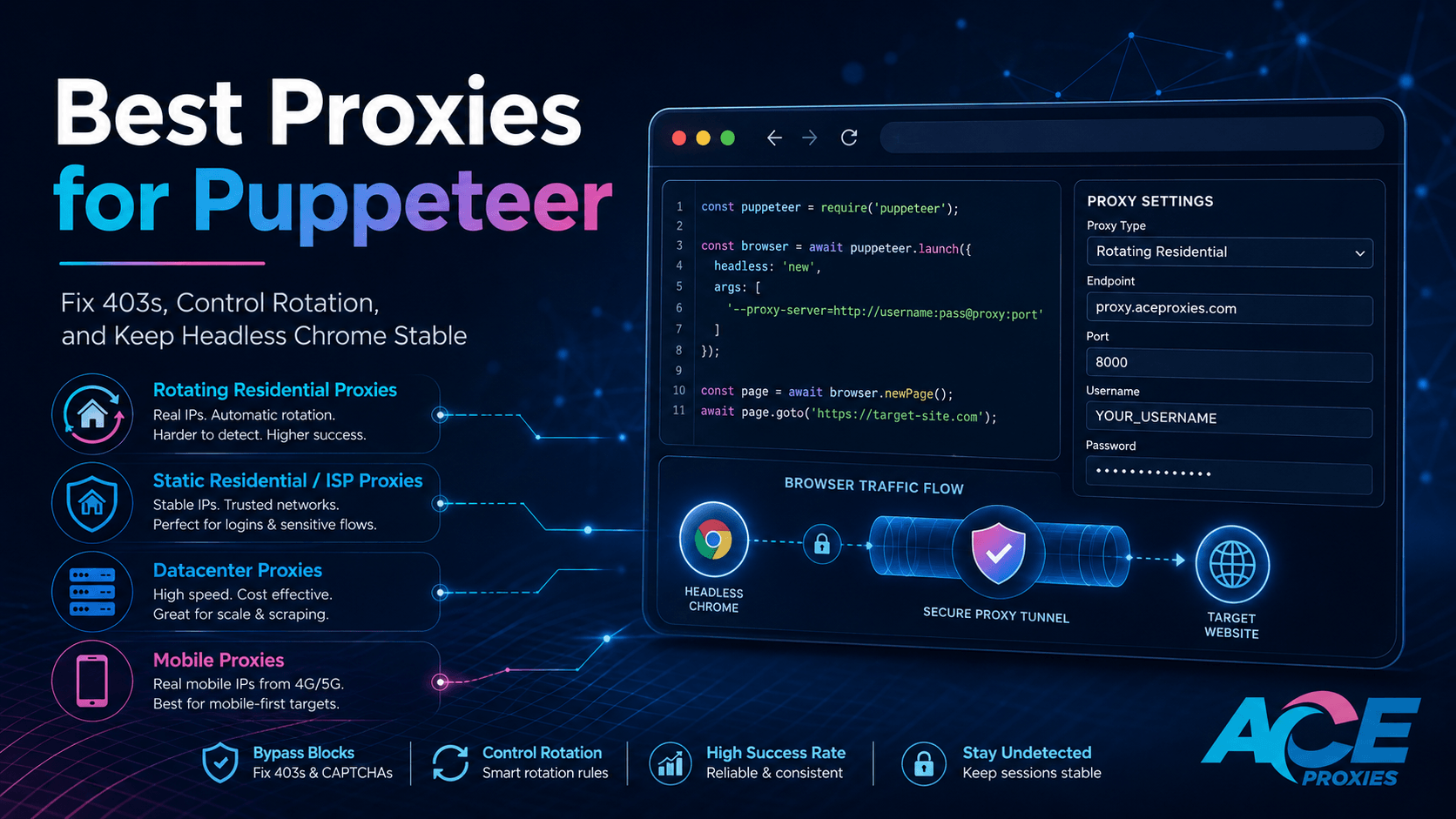
Puppeteer looks incredibly simple until proxies enter the setup.
A basic script can launch Chrome, visit a page, take a screenshot, click buttons, and extract data in just a few lines of code. But once the target website starts returning 403 errors, rate limits, empty HTML, broken sessions, or endless CAPTCHA screens, the problem is rarely Puppeteer itself. It is the proxy architecture behind it.
Puppeteer is a Node.js library that provides a high-level API to control Chrome or Firefox over the DevTools Protocol. Running headless by default, it is one of the most powerful tools available for browser automation, JavaScript-rendered scraping, QA testing, and price monitoring.
However, because Puppeteer behaves like a real browser, a single page.goto() can trigger dozens or hundreds of background requests: HTML, JavaScript, images, CSS, fonts, analytics scripts, and API calls. If all of that complex traffic runs through the wrong proxy type, your setup will become slow, expensive, unstable, and easily flagged by anti-bot systems.
The goal is not just to "add a proxy to Puppeteer." The goal is to choose the right proxy type, configure authentication cleanly, rotate IPs only when rotation actually helps, preserve sessions when stability matters, and reduce unnecessary bandwidth without breaking the DOM.
This guide explains how to find the best proxies for Puppeteer, how to configure them in JavaScript, when to use Rotating Residential vs. Static ISP IPs, and how to troubleshoot the most common headless Chrome proxy failures.
Why Puppeteer Proxy Setups Fail
Most Puppeteer proxy failures stem from a fundamental mismatch between how a full browser behaves and how the proxy rotation is configured.
A simple HTTP scraper sends one request, receives one response, and moves on. Puppeteer is different. A headless browser session loads a page, waits for JavaScript execution, opens WebSocket connections, downloads assets, stores cookies, and navigates redirects before the actual data appears.
That is exactly why a proxy that works perfectly with curl or axios can still fail inside Puppeteer.
The first common failure is rotating too aggressively. If your IP changes while the browser session is still building cookies, local storage, CSRF tokens, or login states, the target site will treat the session as hijacked. A user who logs in from one IP and immediately performs the next click from a different ISP, city, or ASN does not look human. For login-heavy workflows, rotating on every request is a guaranteed path to a ban.
The second failure is using the wrong proxy type for the target. Data Center Proxies are fast and cost-efficient, but their ASNs are easily classified as server traffic. That is fine for internal QA and low-risk scraping, but it will trigger friction on consumer-facing websites that heavily score IP reputation. Residential-style IPs or Mobile Proxies are mandatory when the target expects normal user traffic.
The third failure is handling authentication incorrectly. Puppeteer’s page.authenticate() method is designed to provide credentials for HTTP authentication. However, the official docs note that request interception is turned on behind the scenes to implement this, which can affect performance. In high-concurrency Puppeteer jobs, forcing every page to use authentication plus interception plus heavy resource loading can cause severe slowdowns.
The fourth failure is blocking the wrong browser resources. While blocking images and fonts saves bandwidth, Puppeteer request interception must be coded perfectly. If your script aborts XHR calls or async scripts too aggressively, the page may load faster but return an empty DOM.
The fifth failure is assuming all 403s are proxy problems. A 403 Forbidden error can come from a blocked IP, but it is equally likely to be caused by expired cookies, missing headers, mismatched timezones, overactive concurrency, or broken session handling. Changing proxies without fixing the browser profile usually just burns more IPs.
The Wrong Way vs. The Right Way
The Wrong Way:
You paste a random proxy list into Puppeteer, rotate it on every request, run 50 headless browser instances simultaneously, block every script to "save bandwidth," and then blame the proxy provider when the target returns 403s.
This setup creates massive problems: cookies and IP behavior do not align, bandwidth is wasted on failed retries, and debugging becomes impossible because every failure looks random.
The Right Way:
You match the proxy architecture directly to the session type.
For public data collection on JavaScript-rendered pages, Ace Proxies Rotating Residential Proxies are the best starting point. Backed by a 40+ million IP pool across 195+ countries, they can rotate per request or at 1, 10, and 30-minute intervals. This flexibility allows you to use rapid rotation for stateless jobs, or sticky windows for pages that need short-term continuity.
For login-heavy Puppeteer automation, Ace Proxies Static Residential Proxies (ISP) are the safer choice. They utilize ISP-sourced residential IPs while supporting HTTP, HTTPS, and SOCKS5. Crucially, they include unlimited bandwidth and up to 10 Gbps network connections, ensuring your browser profile maintains one highly trusted identity permanently.
For fast, low-risk, high-volume testing, Ace Proxies Data Center Proxies are the most practical option. They are dedicated private proxies featuring unlimited bandwidth and 1 Gbps connections. They are cheaper and faster, making them ideal for targets that do not require residential trust.
For mobile-first browser flows, Ace Proxies Mobile Proxies are the premium option. They route traffic through real 4G, 5G, and LTE mobile carrier networks, leveraging CGNAT technology to provide the ultimate trust score for strict, app-like flows.
Step-by-Step Guide: How to Set Up Puppeteer Proxies Correctly
Step 1: Choose the proxy type before writing code
Do not start with code. Start with the workflow. Puppeteer can only route traffic through the proxy you give it; it cannot magically turn a low-trust IP into a high-trust one.
| Puppeteer Workflow | Recommended Ace Proxies Service | Best Rotation Style |
|---|---|---|
| Public product pages / directories | Rotating Residential Proxies | Per request or 10-minute sticky |
| Login-heavy dashboards / accounts | Static Residential ISP Proxies | No rotation |
| Internal testing / low-risk QA | Data Center Proxies | No rotation |
| Mobile web testing / strict sites | Mobile Proxies | Real carrier IP behavior |
Step 2: Install Puppeteer and define your proxy details
Install Puppeteer in your Node.js project:
npm i puppeteer
Create a secure .env file for your proxy credentials. Avoid hardcoding credentials directly into your scripts to prevent leaks and make rotation easier:
PROXY_PORT=your-proxy-port
PROXY_USERNAME=your-username
PROXY_PASSWORD=your-password
Step 3: Launch Puppeteer with an HTTP/HTTPS proxy
Puppeteer allows you to pass command-line arguments to the browser instance via launch options. For authenticated proxies, use the --proxy-server argument, then pass your credentials using page.authenticate():
const proxyHost = process.env.PROXY_HOST;
const proxyPort = process.env.PROXY_PORT;
const proxyUsername = process.env.PROXY_USERNAME;
const proxyPassword = process.env.PROXY_PASSWORD;
const browser = await puppeteer.launch({
headless: true,
args: [
`--proxy-server=http://${proxyHost}:${proxyPort}`,
],
});
const page = await browser.newPage();
await page.authenticate({
username: proxyUsername,
password: proxyPassword,
});
await page.goto('https://example.com', {
waitUntil: 'networkidle2',
timeout: 60000,
});
console.log(await page.title());
await browser.close();
Step 4: Use SOCKS5 carefully
While SOCKS5 is highly useful for desktop application routing, Puppeteer runs through Chrome’s proxy stack. In practice, authenticated HTTP/HTTPS proxy configuration is often simpler inside Puppeteer because credentials can be passed cleanly with page.authenticate().
If your SOCKS5 endpoint requires username/password authentication and Chrome struggles to handle it via launch flags, use a local proxy forwarder to handle the authentication upstream, and point Puppeteer to the local no-auth port.
Step 5: Create one browser identity per sticky session
For serious Puppeteer automation, think in terms of browser identities, not just proxies.
If you use a Static Residential (ISP) proxy for a logged-in account, keep that account tied to the same proxy and the exact same browser profile. Puppeteer supports userDataDir to save session states:
headless: true,
userDataDir: './profiles/account-001',
args: [
`--proxy-server=http://${proxyHost}:${proxyPort}`,
],
});
The golden rule for account-based sessions:
1 Account = 1 Browser Profile = 1 Stable Proxy
Step 6: Rotate by browser instance, not randomly inside the page
A common mistake is rotating the proxy while an active Puppeteer page is still loading resources. This causes broken connections, invalid cookies, and confusing retries.
A cleaner architecture:
- Pull a task from your queue.
- Launch a browser context with an assigned proxy.
- Complete the task.
- Close the context.
- Rotate before the next independent task.
For Puppeteer, 10-minute or 30-minute sticky sessions are often much safer than per-request rotation because the browser needs multiple subsequent requests to render one complete DOM.
Step 7: Block unnecessary resources safely
Full browser automation burns bandwidth quickly. Puppeteer request interception can reduce this, but it must be handled carefully.
page.on('request', request => {
if (request.isInterceptResolutionHandled()) return;
const blockedTypes = new Set(['image', 'font', 'media']);
if (blockedTypes.has(request.resourceType())) {
request.abort();
} else {
request.continue();
}
});
This blocks heavy visual resources while allowing critical scripts and XHR/fetch requests to continue, ensuring the JavaScript renders the data you actually need.
Step 8: Add real error handling
Do not immediately rotate your proxy on every failure. If the cause is a blocked resource or a timeout, rotating only hides the real issue.
| Error / Symptom | Recommended Action |
|---|---|
| Timeout | Wait, then retry the same session once |
| 403 Forbidden | Stop session, cool down, then deploy a fresh IP and profile |
| CAPTCHA loop | Upgrade proxy type to Residential or Mobile, then use sticky sessions |
Warning: Do not use per-request rotation for logged-in sessions, carts, dashboards, or account workflows. Sudden IP changes can invalidate cookies, trigger verification, or corrupt session state. Use Ace Proxies Static Residential Proxies (ISP) for long-lived browser identities.
Technical Benchmarks: What to Look For Before You Buy
1. Success rate per completed page
Track how many jobs finish with correct data, not just HTTP 200 responses.
A page can return status 200 and still be useless if it contains a CAPTCHA challenge or an empty shell. For Puppeteer, the best proxy is the one that completes the browser flow cleanly.
2. Rotation interval control
Rotation should match the browser journey. Ace Proxies Rotating Residential plans support per-request rotation, plus 1, 10, and 30-minute sticky intervals. Use sticky intervals for pagination, filters, and rendering heavily scripted pages.
3. Bandwidth per successful page
Puppeteer consumes significantly more bandwidth than raw HTTP scraping due to images, fonts, and scripts. Track your total GB used per valid page.
For heavy headless rendering, the unlimited bandwidth offered by Ace Proxies Static ISP, Data Center, and Mobile plans is a massive operational advantage over metered GB plans.
4. Concurrency per proxy
A single browser instance is heavy. Running too many browser sessions through one IP can create timeouts and block spikes.
Start conservatively. For Mobile Proxies, Ace Proxies recommends no more than approximately 30 concurrent threads per proxy for optimal performance.
5. Location consistency
If your proxy is in New York, but your browser timezone and geolocation suggest Europe, anti-bot systems will flag the mismatch.
For sticky sessions, ensure your proxy country, browser timezone, and Accept-Language headers are perfectly aligned.
Final Verdict
The best proxy for Puppeteer depends entirely on your browser workflow.
For most public JavaScript-rendered scraping tasks, Ace Proxies Rotating Residential Proxies are the best starting point. They provide massive IP diversity, 195+ country coverage, and rotation settings that can be perfectly matched to the browser journey.
For login-heavy automation, persistent browser profiles, and account workflows, Ace Proxies Static Residential Proxies (ISP) are the superior choice. Puppeteer sessions require continuity, and Static ISP Proxies give you a permanent identity with unlimited bandwidth.
For speed-first, low-risk testing, Ace Proxies Data Center Proxies are the practical, cost-efficient option.
For mobile-first pages or carrier-sensitive flows, Ace Proxies Mobile Proxies provide the most realistic network traffic by routing through real 4G/5G carrier networks.
The winning Puppeteer setup is not the one with the biggest proxy list. It is the one with the cleanest match between proxy type, browser profile, rotation interval, and target sensitivity.
Head over to the Ace Proxies Plans page, choose the proxy type that fits your workload, and build around session stability instead of random rotation.
FAQ Section
What is the best proxy type for Puppeteer?
For public data collection, Rotating Residential Proxies are best as they provide IP diversity. For login-heavy Puppeteer automation, Static Residential (ISP) Proxies are mandatory because the IP stays stable. For low-risk speed testing, Data Center Proxies are the most cost-efficient.
How do I add proxy authentication in Puppeteer?
Launch the browser with the --proxy-server argument, then use page.authenticate() with your username and password. Puppeteer’s official documentation states that page.authenticate() natively provides credentials for HTTP authentication.
Should I rotate proxies every request in Puppeteer?
Not always. Per-request rotation works for stateless jobs, but Puppeteer pages usually load many background resources under one browser session. For rendered pages, pagination, or browsing flows, sticky rotation windows, such as 10 or 30 minutes, are much safer.
Why does Puppeteer still get 403 errors even with proxies?
A 403 error can stem from IP reputation, but it is equally likely to be caused by excessive concurrency, mismatched location signals, broken cookies, or a browser profile that no longer matches the session. Check your proxy type and session continuity before assuming the IP is burned.